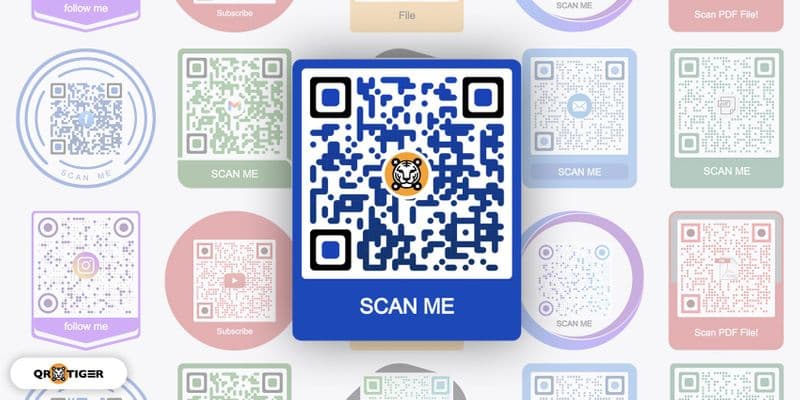
QR Code Design Best Practices: Creating Codes That Actually Get Scanned
Master the art and science of QR code design. Learn how to create visually appealing codes that maintain scannability while reinforcing your brand identity.
Beautiful QR codes that nobody can scan are marketing failures. The challenge is balancing visual appeal with functional reliability – creating codes that represent your brand while delivering flawless user experiences.
The Science Behind Scannable QR Codes
Understanding QR Code Structure
QR codes aren't just random black squares. They contain specific structural elements that scanning algorithms depend on:
Finder patterns (corner squares): Help cameras locate and orient the code Timing patterns (alternating lines): Ensure accurate data reading Quiet zone (white border): Prevents scanning interference Data modules (information squares): Store your actual content
Disrupting any of these elements, even for aesthetic reasons, can make your codes unscannable.
Technical Requirements That Can't Be Compromised
Minimum contrast ratio: 4.5:1 (recommended 7:1) Quiet zone: At least 4 modules wide on all sides Size requirements: Minimum 2cm x 2cm for reliable scanning Error correction: Higher levels allow for more design flexibility
Strategic Design Principles
1. Function First, Form Second
The most beautiful QR code in the world is worthless if it doesn't scan reliably. Start with a perfectly functional code, then add design elements that enhance rather than compromise scannability.
Design decision framework:
Will this change reduce contrast?
Does this modification affect structural elements?
Can scanning algorithms still detect finder patterns?
Is the quiet zone maintained?
2. Brand Integration Without Compromise
Logo placement best practices:
Center placement only: Never cover corner finder patterns
Size limit: Maximum 30% of the code's total area
High contrast: Ensure logos don't reduce readability
Error correction: Use high-level error correction when adding logos
Successful brand integration example: A technology company increased brand recognition by 40% by placing their logo in the QR center while maintaining a 98% scan success rate. They used high error correction and tested extensively across devices.
3. Color Strategy for Maximum Impact
High-performance color combinations:
Classic: Black on white (99% scan reliability)
Brand-safe: Dark blue (#003366) on light gray (#F5F5F5)
Premium: Deep purple (#4A148C) on cream (#FFFEF7)
Corporate: Charcoal (#333333) on off-white (#FAFAFA)
Colors to avoid:
Light colors on dark backgrounds
Red and green combinations (colorblind accessibility)
Neon or fluorescent colors
Colors with insufficient contrast
4. Context-Appropriate Design
Print materials:
Conservative designs that reproduce well in various printing conditions
Higher contrast ratios to account for print quality variations
Larger sizes to compensate for potential print shrinkage
Digital displays:
Account for screen glare and viewing angles
Consider backlight effects on contrast
Design for various screen resolutions and sizes
Product packaging:
Durable designs that withstand handling and shipping
Colors that work with packaging materials
Placement that survives manufacturing processes
Advanced Design Techniques
Custom Pattern Integration
Dot variations: Replace square modules with circles, rounded squares, or brand-specific shapes while maintaining contrast and spacing.
Pattern overlays: Add subtle background patterns that don't interfere with code readability. Test extensively to ensure scanning reliability.
Gradient applications: Use gradients sparingly and only in non-critical areas. Maintain sharp contrast between foreground and background elements.
Use brand colors in frame elements, not the code itself
Provide adequate spacing between frame and code
Include compelling call-to-action text
Responsive QR Code Design
Size adaptation: Different sizes require different design approaches:
Small codes (business cards):
Minimal customization
Maximum contrast
Simple, clean designs
Focus on scannability over decoration
Medium codes (flyers, brochures):
Moderate customization allowed
Brand color integration possible
Logo placement acceptable with testing
Balance aesthetics and function
Large codes (posters, signage):
More design flexibility
Creative shape integration possible
Complex branding elements feasible
Artistic interpretation while maintaining function
Industry-Specific Design Guidelines
Retail and E-commerce
Design priorities:
High-contrast for various lighting conditions
Professional appearance that builds trust
Easy integration with packaging design
Durability considerations for product handling
Successful approach: A cosmetics brand increased QR engagement by 55% using elegant black codes on white backgrounds with subtle brand accent colors in surrounding design elements.
Food and Beverage
Special considerations:
Food-safe printing requirements
Moisture and temperature resistance
Integration with nutritional labeling
Menu aesthetics and readability
Case study: A restaurant chain improved menu QR scan rates from 23% to 67% by using high-contrast codes with appetizing food photography in surrounding frame design.
Healthcare and Professional Services
Design requirements:
Trust and professionalism emphasis
Accessibility compliance
Clear, readable call-to-action text
Integration with medical/professional branding
Best practices:
Conservative color schemes
Clear, sans-serif fonts for accompanying text
Professional imagery that doesn't compete with QR code
Compliance with industry design standards
Events and Entertainment
Creative opportunities:
More flexibility for artistic interpretation
Integration with event themes and branding
Temporary use allows for experimental approaches
Higher engagement tolerance for unique designs
Innovation example: A music festival created QR codes that incorporated sound wave patterns while maintaining perfect scannability, increasing social media sharing by 80%.
Design Tools and Workflow
Professional QR Design Software
Adobe Illustrator integration:
Vector-based QR creation for scalability
Brand color integration workflows
Logo placement precision tools
Print-ready file preparation
Canva QR integration:
Template-based design approach
Brand kit integration
Social media format optimization
Non-designer friendly tools
Custom QR platforms:
API integration for bulk customization
Brand guideline enforcement
Automated testing and validation
Dynamic design updates
Quality Assurance Workflow
Pre-production testing:
Multiple device scanning tests
Various lighting condition validation
Print quality simulation
Brand guideline compliance check
Production monitoring:
First article inspection for print runs
Random sampling during production
Digital display calibration verification
Package integration testing
Post-deployment validation:
Real-world scanning success rates
User feedback collection
Performance analytics monitoring
Continuous optimization opportunities
Common Design Mistakes and Solutions
Mistake 1: Over-customization
Problem: Adding too many design elements that interfere with scanning Solution: Follow the 80/20 rule – 80% standard QR structure, 20% customization maximum
Mistake 2: Poor Color Choices
Problem: Insufficient contrast or problematic color combinations Solution: Use contrast checking tools and test with colorblind users
Mistake 3: Logo Interference
Problem: Logos that cover critical QR code elements Solution: Center placement only, maximum 30% coverage, high error correction
Mistake 4: Inadequate Testing
Problem: Beautiful designs that fail in real-world conditions Solution: Comprehensive testing protocol across devices and environments
Measuring Design Success
Key Performance Indicators
Scan success rate: Target 95%+ across all devices Brand recognition: Measured through user surveys Engagement metrics: Time spent on landing pages Conversion rates: Actions taken after scanning
A/B Testing Framework
Design variables to test:
Color combinations and contrast levels
Logo placement and sizing
Frame styles and call-to-action text
Size and placement on materials
Testing methodology:
Statistical significance requirements
Control group maintenance
Environmental variable controls
Long-term performance tracking
Future-Proofing Your QR Designs
Emerging Technologies
Advanced scanning capabilities:
AI-powered scanning improvements
Enhanced low-light scanning
Augmented reality integration
Voice-activated scanning
Design implications:
Prepare for new aesthetic possibilities
Consider AR overlay integration
Design for voice command compatibility
Plan for enhanced customization options
Accessibility Evolution
Inclusive design principles:
Visual accessibility improvements
Audio QR code alternatives
Tactile integration possibilities
Multi-sensory design approaches
Implementation Strategy
Phase 1: Foundation (Weeks 1-2)
Establish brand-compliant QR design standards
Create design template library
Implement testing procedures
Train design team on QR requirements
Phase 2: Optimization (Weeks 3-6)
A/B test design variations
Collect performance feedback
Refine design guidelines
Scale successful approaches
Phase 3: Innovation (Ongoing)
Experiment with new design techniques
Monitor industry best practices
Implement emerging technologies
Continuous performance optimization
The Bottom Line
Effective QR code design isn't about choosing between beauty and function – it's about achieving both through informed design decisions. The brands succeeding with QR codes understand that great design enhances scannability rather than compromising it.
Start with technically perfect codes, then add design elements systematically while maintaining rigorous testing standards. Your QR codes should be unmistakably yours while remaining effortlessly scannable for every user, on every device, in every condition.
Remember: a QR code that represents your brand beautifully but fails to scan is a marketing failure. A QR code that scans perfectly while reinforcing your brand identity is a competitive advantage.
The choice is yours – but the path to success requires mastering both the art and science of QR code design.